Bank Reconciliations
Spectra’s Bank Reconciliation is designed to be a clearing process that is quick and easy to verify bank statement items. The resulting report notes discrepancies between the bank statement balance and the balance of your general ledger control account, as well as lists all outstanding and reconciled bank items.
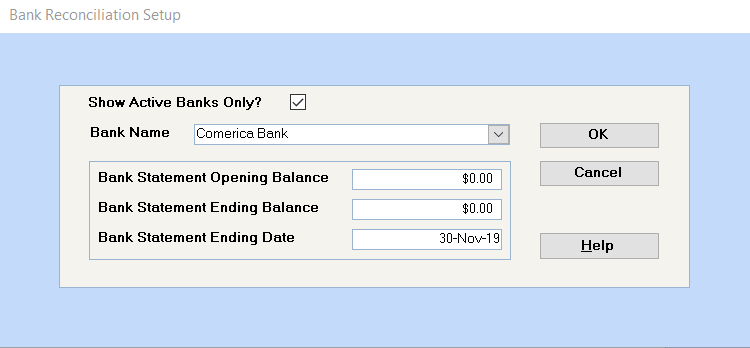
Select the bank from the dropdown list. Only bank accounts set up as a "bank" in the database will appear on this list
Enter the opening and ending balances as per the Bank Statement. If this is the first bank reconciliation done for this bank account in SPECTRA, you must follow the instructions for the first bank reconciliation shown below.
Enter the date from the bank statement. The system will use this date to find all transactions with this date or earlier to display in the bank reconciliation. Click on OK to continue.
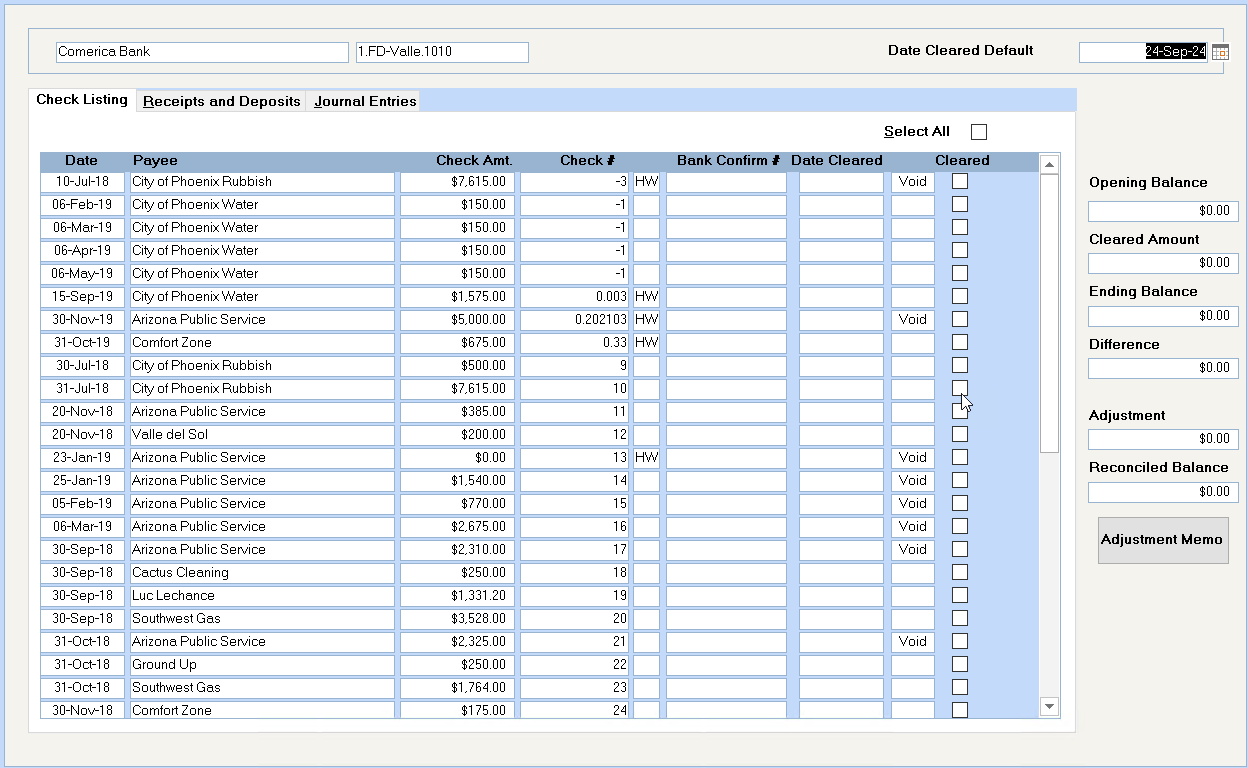
The bank name and G/L account number displays at the top of the screen
Defaults to today’s date, but you may wish to change this to the bank statement date. This date will show on the check register report as the check reconciled date.
Click on one of these three tabs to display all outstanding checks, deposits, or journal entries. On each of these screens you may click on the "Select All" button to indicate that these have all cleared the bank. Clicking on the "Select All" button again will deselect them all. Select the individual items for clearing by clicking in the "Cleared" box for that line.
1. The checks with a "-1" check number are standard invoices set up as auto withdrawals.
2. If a check is voided, it will show as outstanding until the actual void date and then will show "Void" next to the date cleared column. Clear voided checks in the month that the check was cancelled in the General Ledger.
This is taken from the amount entered on the first screen of the bank reconciliation.
As checks, deposits, and journal entries are cleared, the system displays the net amount here.
This is taken from the amount entered on the first screen of the bank reconciliation.
Based on the opening and ending balances and the amount cleared so far, the system calculates the balance that remains to be cleared on the bank reconciliation.
In order to complete the bank reconciliation successfully, the reconciled balance must be zero. Save: You may save the reconciliation at any point when the Reconciled Balance is not zero by clicking on the Close button on the toolbar. You will be prompted that the reconciliation isn’t in balance and that you can save and finish it at another time.
Be cautious using the adjustment field. You may use this amount field and memo explanation field for bank errors that will be corrected in a following month. Do not use this for entries that must be reflected in your General Ledger, e.g. Bank Charges, NSF Checks, Loan Payments, etc.
Putting an amount in the Memo Adjustment field will enable you to complete the bank reconciliation, but it won’t update your General Ledger. If the GL balance must be adjusted, you should instead do an entry through the system, e.g. a journal entry that will affect the GL.
See "Alternative to using the Memo Adjustment field" below.
When the Reconciled Balance equals zero, the Bank Reconciliation is balanced from the system’s perspective. If you wish to use this program as a complete bank reconciliation, prior to completing the bank reconciliation, check the G/L Reconciliation Variance.
To do this, leave one item uncleared, so that the Reconciled Balance equals the amount of the uncleared item. Then, close the door on the top tool bar to save this as an unfinished bank reconciliation. Print out this unfinished reconciliation so that you can check the variance to G/L amount. If all is well, it should be the same as your Bank Reconciliation variance.
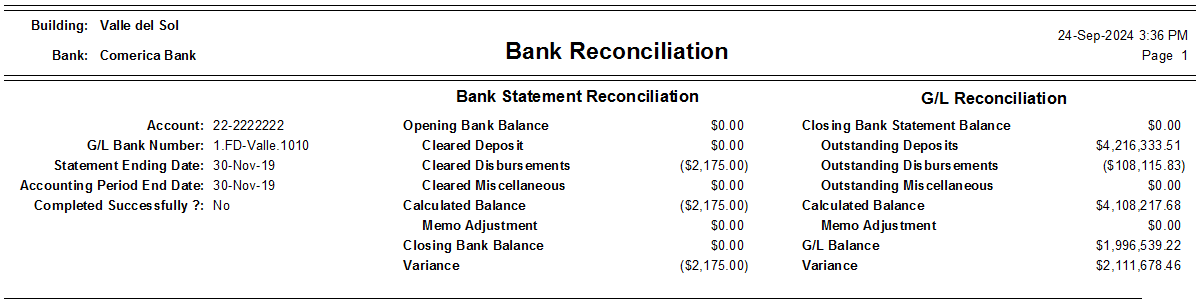
If these two amounts are not the same, there are several factors that can contribute to the variance on the G/L and these are shown in the Bank Reconciliation Variances section below. If they are the same, you may open the bank reconciliation program again and clear the item you un-cleared, so that the Reconciled Balance equals zero.
Click on the Close button, and you will be reminded that you have balanced your bank statement and that the reconciliation cannot be opened again once it is saved. Answer Yes to save it.
Having saved the bank reconciliation, you will be asked if you would like to print a report of the reconciliation. It will note any discrepancies between the bank statement balance and the balance of your bank general ledger account and list all outstanding items. This same report is always available from the Reconciliation Report menu item.
The problem with the first Bank Reconciliation is that items not entered in SPECTRA do not show on the list of un-cleared items. Here’s what you should do if your starting date of your system is May 1st and your opening G/L balances were entered as of April 30th:
1. As part of your opening balance journal entry to set up your General Ledger balances record your opening Bank Balance per G/L as of your starting date: e.g. Dr. $35,332.50.
2. Do a journal entry using the date of your last bank reconciliation, e.g. April 30th. All lines of the journal entry will debit or credit the bank G/L account number. The sole purpose of this journal entry is to break down the opening bank balance into the bank reconciliation components, e.g.
G/L Acct Dr. Cr.
April 30th Balance per Bank BldgID. Acct 226,407.18
O/S Deposit BldgID. Acct 6,039.65
O/S Check # 11380 BldgID. Acct 185,300.82
O/S Check # 11381 BldgID. Acct 1,033.62
O/S Check # 11382 BldgID. Acct 1,553.64
O/S Check # 11383 BldgID. Acct 8,250.50
O/S Check # 11384 BldgID. Acct 975.75
Break down opening balance BldgID. Acct 35,332.50
3. Do your first Bank Reconciliation as of May 31st:
Bank Statement Opening Balance: Zero
Bank Statement Ending Balance: Actual Bank Balance
Bank Statement Ending Date: May 31st
Clear off the items that have cleared the bank, remembering that all the entries from the journal entry from Step #2 will be in the section entitled Journal Entries. Remember to clear off the April 30th Balance per Bank amount of $226,407.18, in this example.
4. Your June 30th Bank Reconciliation would continue with actual Bank Opening and Ending Balances as per your Bank Statement.
For example, if the Bank took a $50.00 loan payment out of your account incorrectly, the memo adjustment will update both the Bank Reconciliation and the G/L Reconciliation side which is fine for the first month.
For the second month, when the bank puts the money back into your account, you have to do a memo adjustment, and this would artificially create a variance on the G/L Reconciliation side.
The general rule of thumb is "if the actual and the calculated G/L balances are equal, ignore the variance." This is because the memo adjustment prints under both the bank statement reconciliation and G/L reconciliation columns and sometimes it is only needed on the bank statement side.
In the example above, the variance could be avoided entirely, if the whole entry was done by journal entry. When the bank error comes to light, do a journal entry that debits and credits the bank account, thus having no net effect on the G/L balance for the Bank account.
1st month: Clear the $50.00 credit to reflect the $50.00 deducted from the bank. This leave the $50.00 debit as an outstanding item for next month’s reconciliation.
2nd month: When the bank returns the $50.00 to your account, clear off the $50.00 debit.
That’s it. No confusing variance on the G/L Reconciliation.
Also, the Memo Adjustment field can become very confusing if there are multiple adjustments that have to be made to the Bank Reconciliation. Using journal entries to record these adjustments keeps everything separate and identifiable.
An outside payroll program will create a lump sum payroll entry, which is fine for privacy, but creates problems with bank reconciliations.
Here’s an alternative: Do a journal entry that debits the bank for the amount of the payroll checks, then do a separate credit entry to the bank for each check that didn’t clear and one credit entry for the lump sum amount of the checks that did clear. In this way, when you do your bank reconciliation, you can check off the two lump sum journal entries against each other and the lump sum amount of the checks that cleared and then be left with the individual outstanding "checks" to reconcile.
If the Bank Reconciliation report shows a variance on the G/L side, you should check each of these:
1. Does the current month’s Opening Bank Balance agree to the previous month’s Closing Bank Statement Balance?
2. Did you write a check dated in a different month than the posting date?
3. Did you void a check using a different posting month then the original check posting?
4. Bank interest or charges recorded on the bank statement but not in the G/L?
5. Did you NSF a check in a different month than recorded in the system or the bank statement?
6. Was your opening bank rec done correctly to get the bank recs set up right? (See First Bank Reconciliation above.) Have you done each bank rec successfully since that date?
7. Did you expense an invoice to your bank G/L account? This entry will not appear in your bank rec for you to reconcile. You must do a memo adjustment to reconcile the bank rec.
8. Did you enter a miscellaneous cash receipt posting coded to your bank G/L account? This will not appear in your bank rec to reconcile. You must do a memo adjustment to reconcile the bank rec.
9. Is this month the first period in your fiscal year? If so, did you run a temporary year-end close to bring forward your opening bank balance?
 Watch Video Tutorial